I love keyboards. I like making these tactile little tools for writing and coding. I like making them my own. Colors, tactility, the macros and layout customization make them just better than using any off-the-shelf membrane or scissor switch keyboard.
When I travel, I’ll often bring an iPad or, now, my new MacBook Neo. These flat scissor switches feel disappointing to type on though. The shape of the MacBook Neo keyboard is great, but I often miss the tactility of a real keyboard on the go. So I went out and bought a 40% keyboard, the Epomaker TH40. It’s a compact version of the 40% layout, and that makes it great for travel. It’s also the reason it may not be as good to use as I had hoped. Because 40% keyboards always have to sacrifice keys and use often unconventional layouts to make their keyboards smaller, but the Epomaker TH40 may not have done it the right way. The 40% keyboard isn’t necessarily terrible, you use one all the time on your smartphone. But Epomaker’s implementation of it might not be what you’re looking for unless you’re willing to spend a very long time adapting your muscle memory and adding many layers on keys that may not always make sense. Here’s everything they got right—and wrong.
In This Article:
Specs
- Dimensions: 258mm x 97mm x 35 mm
- Weight: 0.5kg
- Available Switches:
- Epomaker Flamingo Switch
- Linear
- 47gf actuation force
- 60gf bottom out force
- 3.8mm total travel
- dual spring
- Epomaker Wisteria Linear Switch
- Linear
- 45gf actuation force
- 45gf bottom out force
- 3.6mm total travel
- single spring
- Epomaker Flamingo Switch
The Layout

Why?!
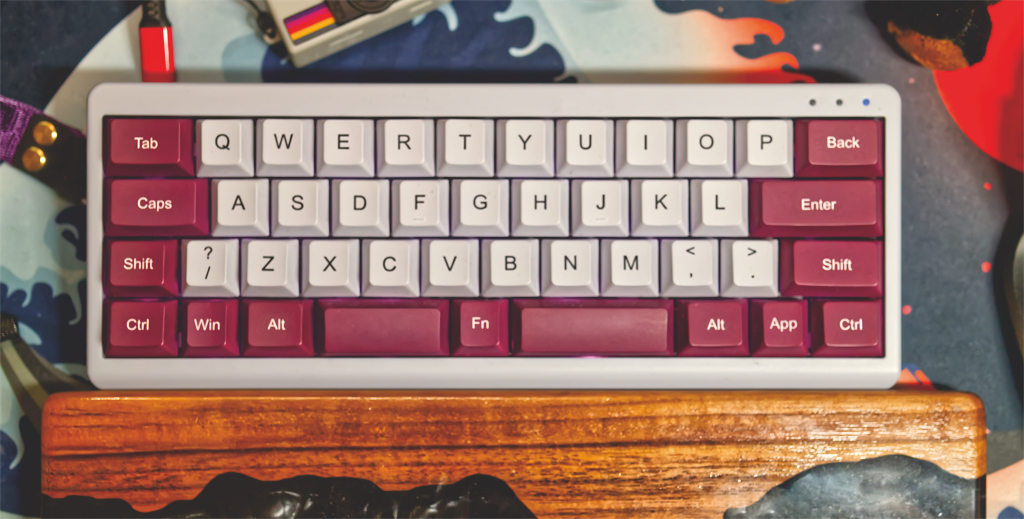
Let’s address the elephant in the room… on the wrong side. The /? key? It’s on the left side. The left shift, likely the one you use the most, is now a lot slimmer, and in its place, a key you don’t expect to be over there. But wait, it gets worse. Because every modifier key besides that one is nearly full sized. That means you lose a bunch of keys on the keyboard without the benefit of a smaller keyboard. You’re going to need lots of layers to make this keyboard work for you, and that gets confusing and difficult to remember quickly.
Admittedly, this makes it a far more pure 40% keyboard than the Keychron, but the sacrifice just isn’t worth it. Your pinky finger rests on the enter key. You lose two keys on the top row so the backspace could be full-sized, a key or two on the next row for a full-sized enter, and one or two on the next row too. All together, you lose about 5 keys verses this exact form factor, but with smaller modifiers, like i have on another one of my 40% keyboards, my KBDfans Agar Mini (review in progress). That one puts the question mark on the right side and gives you a nice ;: key to rest your pinky on. Let me tell you, 40% layouts can be comfortable, but I wouldn’t have known it if the TH40 had been my only 40% keyboard. Between the shift key, /? key, and losing keys on every row, this may be my least favorite 40% layout. That doesn’t mean it’s my least favorite keyboard, but certainly my least favorite way of putting specific keys under my fingers.
You have to type ‘” constantly. You’ll notice it missing. And, if you’re like me, and you write code, you’ll certainly miss the ;: key. Having one or the other there would be very nice. Having both would be wonderful.
I love this size. I love the shape. I love what they did with this keyboard. But that layout? It’s maddening. When I have other options available, it ruins it. They got rid of all the important keys on the right side of the board and as a result, you’ll center your hands just about as far to the right as you can on this board, and you’ll sorely miss the keys that should have been there.
Switches
I hate linear switches. They feel like such a waste of a mechanical switch. Smooth linear action, no tactility, and they all feel basically the same. Some slight variation in the spring tension or return, but largely, all the same. The Epomaker TH40 comes with two switch choices. You can get a linear switch or… another linear switch. Golly, I wonder which I got! There’s the Epomaker Flamingo switch, which has a double spring, so it sounded more interesting than their Wisteria switch, which didn’t have a double spring. Both had about the same activation force, but one had more bottom out force. I went for that one.
Can’t tell you I used it much. Typed on them a bit, went, “Yup, that’s linear,” yawned, and swapped them out. I swapped it out for tactile switches right away. Tactile switches I’ve already reviewed, actually. Keychron’s Jupiter Banana tactile switches. I reviewed them in my review of Keychron’s almost 40% keyboard. They’re completely passable switches. Not my favorite, but they’re perfectly okay.
Wireless
 I usually opt out of wireless on my custom keyboards. This one comes with wireless, I could see it being helpful when traveling, so I was sure to test the wireless features. It’s actually good. Wireless often disappoints me, but, for the most part, this worked almost well enough to make me forget when it was on my desk that it wasn’t plugged in. It made me disappointed in a number of others I tried. Yes, if you’re using one of the Bluetooth profiles, you’ll have to disconnect from your other device to make it connect to a new one. But you’ve got three devices, one using a wireless dongle, a switch to easily toggle the modes, and, of course, USB-C still works just fine.
Combined with the battery life, this made me think twice about abandoning wireless on my keyboards. Though not all of them measure up to Epomaker’s.
Battery Life
When on bluetooth, you can see your battery life in the bluetooth menu of your device. The Epomaker has some good power management. I barely had to think about it running out of battery while testing it. It lasted weeks. You will notice the backlight turn off, but it wakes up and retains the connection, allowing it to go from asleep to typing almost instantly. It’s been faster than my others, reliably picks up after sleep, and protects the battery life. I’d say they did a good job on the firmware here.
Customization

I think it’s obvious which layout I prefer
One thing that bugs me about small keyboard manufacturers is that, when you go to customize them on Via, you often can’t just plug and play. This is because many don’t have their definitions and keymaps uploaded to Via yet. I thought Epomaker was large enough and this keyboard was out long enough that I thought it would be ready to customize from the start. It wasn’t.
Good news though! Epomaker has directions on how to upload their draft definitions and get to customizing. I do like Via’s editor for QMK keyboards, but I have found limitations. It seems it doesn’t support using a spacebar as a function key on hold vs tap. This could be an issue with Via though, I’ve only gotten this working on a keyboard using different firmware.
Customizing the hardware is mostly limited. You can swap out the strap. I haven’t. I haven’t used it, and yet, I just can’t swap it out. It’s cute. It matches the colorway of the key caps. I like it. You can swap the switches or keycaps. But, if you want to do anything internally, you’re in for a shock. There aren’t screws. Instead, you’ll have to use a pry tool and carefully unclip the top and bottom parts of the case. Take it from someone who has taken apart an iPod, you do not want to mess up something with clips like that. I had to replace my iPod faceplate despite being careful. I’m sure the same would happen here. This keyboard is staying sealed.
Construction and Sound
Normally I might take a case apart to add case foams. However, this actually sounds pretty good out of the box. Solid, deep sound. It feels well constructed, even though it’s lightweight. The stock switches I had, Epomaker’s Flamingos, sounded excellent, as do Keychron’s Jupiter Banana switches. It’s got a good thunk to it. I like it.
Just wish there were some screws so I could customize it some more.
If you prefer a pingy or metallic sound, I’m sorry to say that you’d have to customize it if you’d actually like that. For most people, I think the solid, thocky sound will be far superior, and all you have to do for that is just start typing on it. For those who want to change it, you’ll have to worry about all those clips.
Ergonomics
Between the modifiers and misaligned /? key, there’s a lot of action going on on the left side of this keyboard. That’s not ergonomic. You end up sort of angling your right wrist out of the way. Somehow, positioning it the way I was, made my wrists less comfortable on this smaller keyboard. It’s not seriously painful, but it’s certainly not perfect. I ended up having some wrist pain that I didn’t know if I could attribute to the keyboard or the new trackball I was testing. It didn’t feel like my keyboard was comfortable to return to though, which is normally something I can say when a different device is the problem. You place your index fingers on the F and J keys typically. But look at what that does on this keyboard. It’s very obvious when you look at the G and H keys. The H key should be closer to the center. Instead, if feels like the entire keyboard has been shifted one key over. This entire keyboard just feels like it’s shifted too much to one side. The end result may be discomfort in your right wrist.
Overall
 I want to love this. Epomaker is making these cute little keyboards, they’re portable, battery powered, lightweight, and they’re dedicated to making different types of keyboards for enthusiasts. This was the first real 40% I bought after testing the Keychron and wanting something more compact. But now, against my other two 40% keyboards, I realized this layout is the most difficult to use. The Keychron is so large it’s silly to call it a 40%, but the Epomaker just wastes space with large modifier keys and a misplaced /? key.
I could see still using this when on the go though. My final 40% keyboard for review is a KBDFans Agar Mini. It’s about the same size as this, but with more of a small HHKB layout and a weight. I can remove the weight, but I like it, I like it on my desk with it. Without it, it would weigh about as much as the Epomaker. But why bother all of that work each time I want to take a keyboard somewhere? Poorly thought-out layout aside, the Epomaker is lightweight, compact, and even has a cute carrying strap. It’s still good as an on-the-go mechanical keyboard.
For my desk, for my everyday use, the Epomaker TH40 isn’t the 40% for me. I’ve tried different 40% keyboards I like more and have gotten comfortable enough on one of them to wonder if I need to go back to an HHKB once this 40% keyboard review series has wrapped up. They feel huge now! And while the Epomaker helped me on that journey, it’s not the keyboard I feel most comfortable having under my fingertips.
Maybe the next version will be better?
I just couldn’t get over the layout and wasted space on this 40% that could have been so much more. But, that said, it’s still a nice little compact 40%. And for just $80, it might be your best way to give this more compact layout a try to see if you like it.